Field Manual Books
Practical field manuals by a former CIA officer · calm, sourced, no gadget hype

The core routine

The 90-second room sweep

Run it once when you arrive, before you unpack. Four steps, your eyes and your phone, and then you get your evening back.

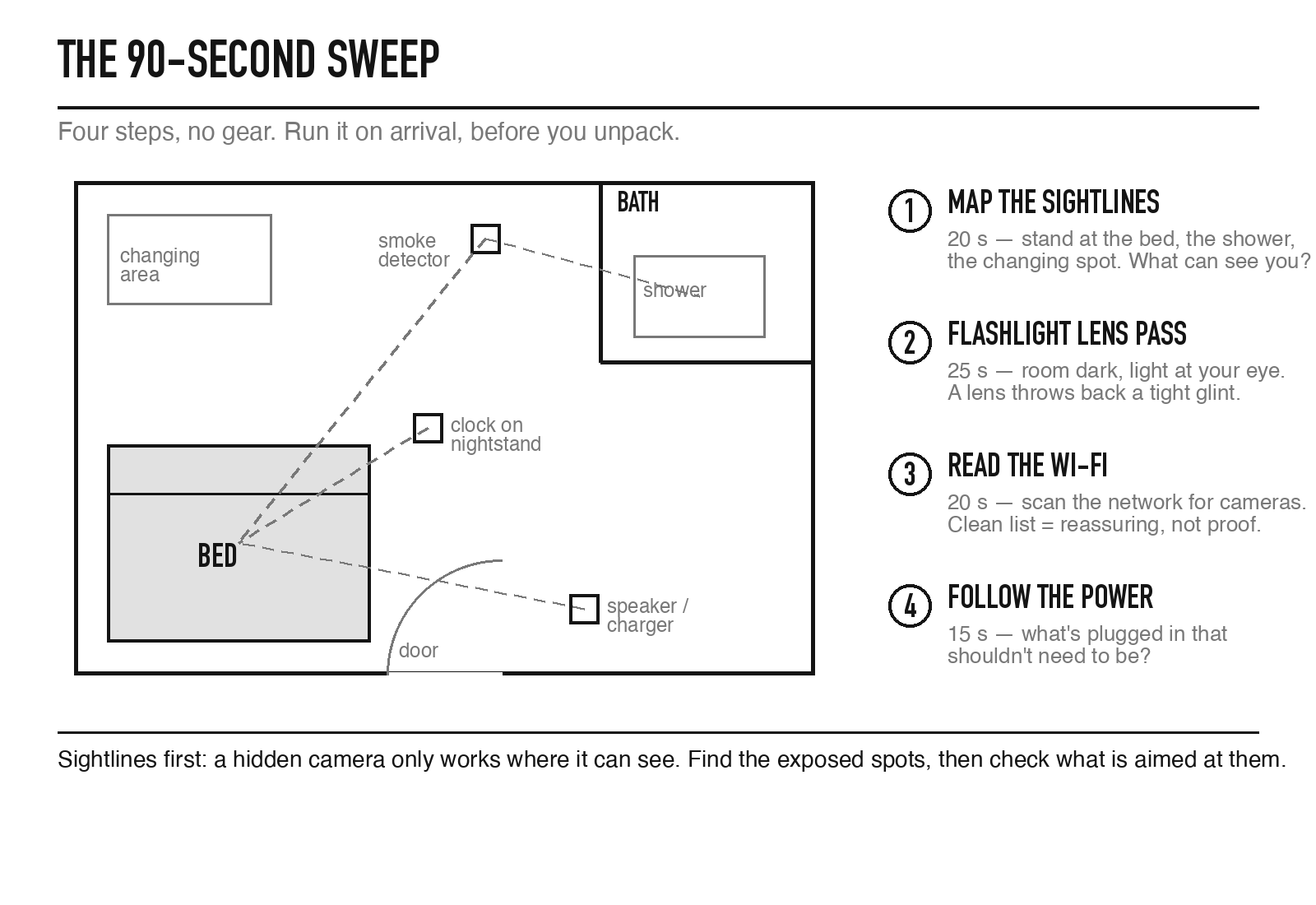
Top-down room diagram showing sightlines from the bed, shower and changing area, with the four sweep steps

Step 1 — Map the sightlines (20 seconds)

Stand at the bed. Look around the room from that spot — what has a clear view of you here? Do the same from the shower and from wherever you'd change clothes. You're finding the three or four exposed spots, then scanning everything aimed at them: alarm clocks, "air fresheners," Bluetooth speakers, décor, smoke detectors, outlets, and any small electronic positioned with a suspiciously good view. A hidden camera only works where it can see — which is why you check sightlines first, not objects. Not sure about one specific thing in the room? Check it against the object-by-object guide.

Step 2 — The flashlight lens pass (25 seconds)

Lights off, curtains closed. Hold your phone's flashlight right next to your eye and pan slowly across the objects you flagged. A camera lens reflects light straight back as a tiny, bright pinpoint that winks in and out as you move your head. This is the one check that catches a camera even if it's switched off or not transmitting — and the one thing an app physically cannot do for you. Full technique here.

Step 3 — Read the Wi-Fi (20 seconds)

Join the property's Wi-Fi and open a free network scanner (Fing or Wifiman). Look for device names containing "cam" or "IPC," camera vendors you weren't told about, or simply more devices than you can account for. The honest limit: a host can put a camera on a separate network you'll never see, and a camera recording to a memory card doesn't need Wi-Fi at all. A clean list is reassuring — not proof. Use this step alongside the others, never alone.

Step 4 — Follow the power (15 seconds)

A final glance at what's plugged in. Always-on cameras need constant power, and the wiring gives them away: a cable disappearing into a device that shouldn't need one is the classic tell. Two seconds of "why is that plugged in?" beats an hour of worry.

When ninety seconds isn't enough: escalate to a ten-minute walkthrough if you're staying more than a couple of nights, the listing is a whole private home, something already feels off, or you simply won't relax until you've looked properly. The full room-by-room walkthrough is in the book.
Field Manual Books
Free: The 90-Second Room Sweep Checklist

The four steps above, as a one-page printable — email it to yourself before you travel.

Skip and download directly

Cover: The Traveler's Counter-Surveillance Field Manual
The Field Manual — PDF edition

This page is the skeleton. The complete system — every check on this site plus the ten-minute walkthrough, audio devices, your legal rights, and what to do if you find something. 47 printable pages, instant download, keep it on any device.
Skip and go straight to checkout

Keep going

Find hidden cameras in an AirbnbWhere devices actually hide, and the rules hosts must follow. Airbnb vs. Vrbo vs. Booking.comThree platforms, three different lines on indoor cameras — which one applies to your booking. The flashlight trickThe one free method that catches a camera even when it is off. The two-way mirror testWhy the fingernail trick doesn't work — and what does. Do detector apps work?What a controlled lab study found when 11 apps met real hidden cameras. Find a GPS tracker on a carThe 60-second check, plus the data your rental car keeps. Unknown AirTag alert?What the tracker warnings can and cannot do, and the manual check. Found something? Do thisThe order matters: don't touch it, cover your sightlines, document. Check a hotel room for hidden camerasDifferent risk than a rental, same 90 seconds — plus the housekeeping tell. Bugged? Here’s the honest answerAudio is a different problem than cameras — what actually finds a bug, and what can’t be found. Is a hidden camera illegal?The federal law, the state law, wiretap rules, and platform policy — in plain English. The Workplace Privacy ChecklistWhat your employer can actually see, and the 10-minute check that tells you where you stand. The Renter's Smart-Home Privacy ChecklistWhat landlord-installed smart locks and sensors can log, and the move-in check that tells you where you stand. Remove yourself from 30 people-search sitesDirect opt-out links, honestly rated — no paid removal service required. Is your smart TV spying on you?What ACR tracking actually does, and the one setting that turns it off. Is your own camera exposed online?The two-minute check for a baby monitor or home camera you own — not one someone hid. Neighbor's camera pointed at your house?What you can ask for, what the law actually protects, and when it crosses a line. Is an AI notetaker recording your meetings?Zoom AI Companion, Otter, Fireflies, Granola — the signs it’s on, and the lawsuits now testing whether that’s legal. Who else can see your doorbell camera?Police requests, employee access, and what actually changed in 2024 — your own camera, not a hidden one. Does your car report your driving to your insurer?GM's finalized FTC settlement, the data brokers involved, and how to check your own car's settings. Does your neighborhood have a license-plate camera?What Flock-style cameras at a gate or entrance actually keep, the August 2026 retention change, and how to ask your HOA or building. Does Alexa, Siri, or Google Assistant record you?The 2019 human-review stories for all three, what changed since, and the setting that actually limits it. Does your robot vacuum photograph your home?Where the images go, two documented cases, and the settings that actually limit it. Do smart toys record your child’s voice?Two documented breaches, and the four questions to ask before a connected toy goes in the toy box. Does your fitness tracker’s data belong to you?The insurance discount that wants it, and three real cases where it ended up in a courtroom instead.